
Creating a Lead Magnet: What Is It and Why Do You Need One?
What is a lead magnet and why does it work so well on LinkedIn? Learn how free content attracts warm leads and amplifies your reach with the flywheel effect.
5 min readRead article
Cookies
We use cookies for analytics to improve our website. Cookie policy
Learn how to create a converting lead magnet for LinkedIn. From checklists to templates: practical examples and automatic distribution with LinkedIfy.

You've seen it on LinkedIn. Entrepreneurs posting "Comment FREE and I'll send you my checklist!" Hundreds of reactions. Dozens of new connections. An inbox full of warm leads. But how do you create a lead magnet that actually works?
A lead magnet is a free piece of valuable content you give away to your target audience. A PDF, checklist, template, or video. The idea: you offer something of value, and in return you get the attention of potential customers.
On LinkedIn, this works differently than traditional lead magnets. No landing page, no email form. People simply comment with one word. The magic keyword. Under your post. That low barrier generates far more responses than any form. And every comment signals the LinkedIn algorithm to show your post to more people.
Want to understand the difference between a lead magnet and a freebie? Read our explainer article.
There are dozens of formats, but these four work best on LinkedIn:
Checklists and step-by-step plans. Short, concrete, immediately actionable. Think "The 47-Point LinkedIn Profile Checklist" or "Monthly Bookkeeping in 10 Steps." Works when your audience doesn't know where to start.
Templates. Ready-made documents people only need to fill in. "25 LinkedIn Post Templates" or "The Perfect Proposal Template." Saves your audience hours of work.
E-books and PDF guides. For when you want to go deeper. Keep it concise: 10 strong pages beats 50 boring ones.
Prompts and tools. Increasingly popular: AI prompts, calculators, or assessments. Low barrier and immediately usable.
The best lead magnet solves one specific problem. Not three, not five. One. And you should be able to explain it in five words or less.
Need more inspiration? Check out 15 lead magnet ideas that generate more leads.
Robbert van Empel
AI Speaker | Author | Futurist
3d·
"Niemand leest je getypte notulen" (maar iedereen wil dit briefje zien) We maken elke dag pagina's vol tekst. ↳ Verslagen van meetings. ↳ Samenvattingen van boeken. ↳ Brainstorms en ideeën. En heel eerlijk. Het is saai. Het is steriel, zwart-wit en onpersoonlijk. Maar wat a...
Why does this work so well? Robbert doesn't start with his offer. He starts with a problem everyone recognizes: "Nobody reads your typed meeting notes." Painfully relatable. Then he offers one simple solution. A prompt. Not a 50-page e-book. Just something you can use right away.
The result: nearly 1,900 comments on a single post.

The magic keyword is the word people comment to receive your lead magnet. A good keyword is short (one word), relevant (matches your lead magnet), and unique (not something people type accidentally).
Keywords that work well: TEMPLATES, CHECKLIST, PDF, FREE, GUIDE. Avoid generic words like "Yes" or "Interested". They're harder to automate and create noise.
LinkedIfy sends your lead magnet to everyone who responds.
The problem starts when your post goes viral. 100 comments, 200 comments. Manually sending each person a DM takes 2-5 minutes per lead. With 200 responses, that's a full working day gone.
You share a LinkedIn post with a magic keyword
People comment with your keyword
LinkedIfy automatically scans all comments
First-degree connections receive your lead magnet via DM
Social proof reply under the lead's comment
LinkedIfy automates this entire process. Connect your LinkedIn account, select your post, set the magic keyword, and LinkedIfy handles the rest. Every comment is scanned. First-degree connections receive a personalized DM with your lead magnet instantly. Non-connections get a wall comment as social proof.
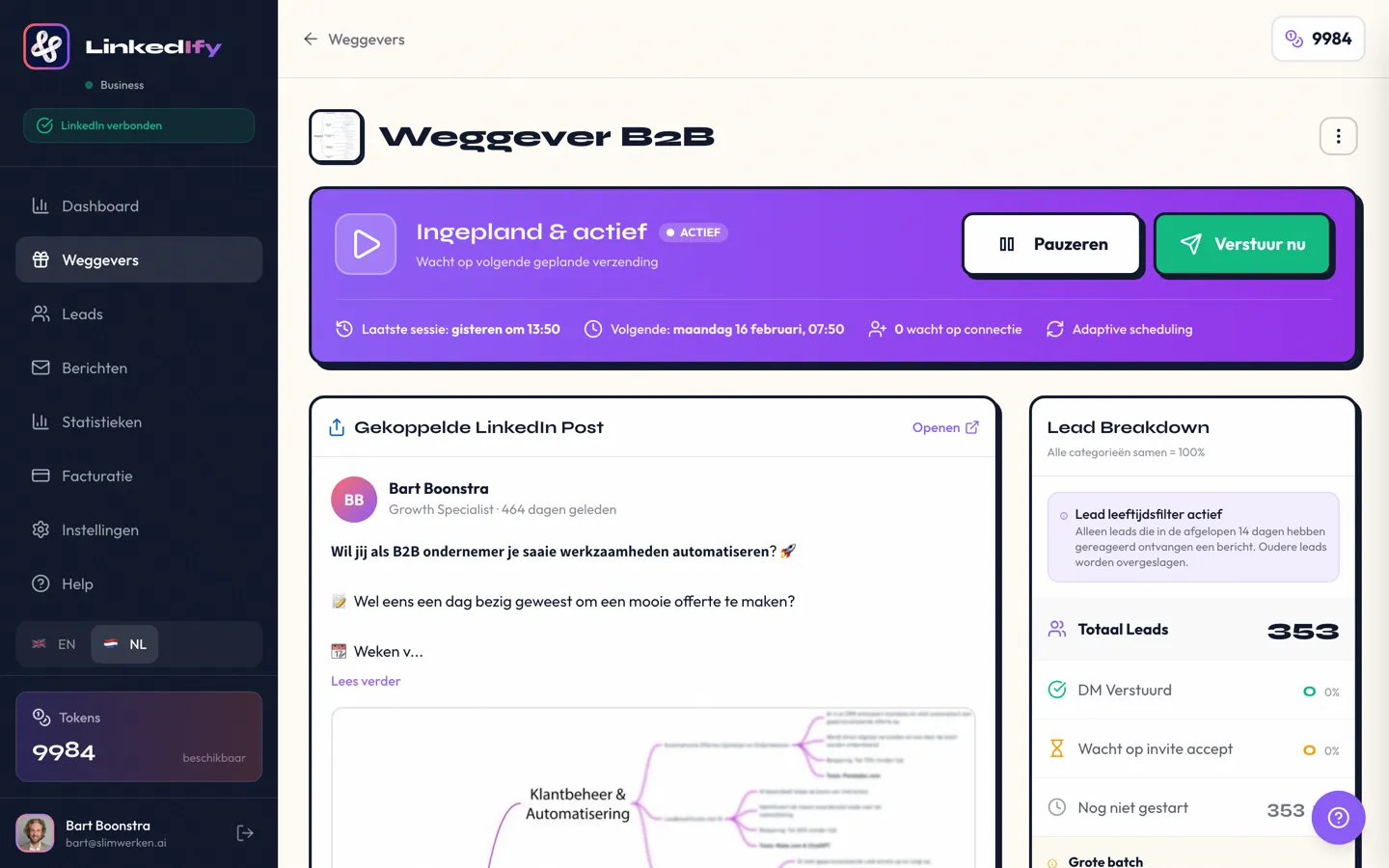
The beauty: while you sleep, LinkedIfy keeps delivering your lead magnet. No missed responses. No manual copy-paste. Just a system that runs.
Creating a lead magnet doesn't have to be complicated. Pick your audience's biggest problem, turn it into a short checklist or template, and write a LinkedIn post with a clear magic keyword.
A lead magnet is a free piece of content you offer in exchange for contact with a lead. Think PDFs, checklists, templates, or short videos. On LinkedIn, you share it via a post with a magic keyword.
Short, immediately actionable content performs best. A 1-page checklist or template converts better than a 30-page e-book. Readers want quick results, not homework.
Yes. The goal isn't immediate revenue. It's building a list of warm leads. You give something small to earn trust. The real value is in the follow-up: coaching, services, or paid products.
At least once a week. Each post only reaches a fraction of your network. Vary the angle: focus on the problem one time, the result the next. Repetition isn't spam. It's reach.
Yes. With LinkedIfy, you set a magic keyword. Anyone who comments that keyword automatically receives your lead magnet via DM. No more manual copy-pasting.
LinkedIfy handles the rest. Start your free trial.
Try LinkedIfy free for 7 days. No credit card required. Your first campaign live in 15 minutes.
No credit card required - Set up in 2 minutes